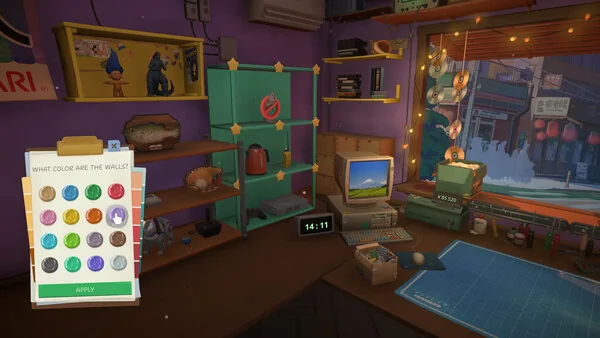
Can you play ReStory on Mac? Yes. The official Steam listing includes macOS support and specifies macOS 14 or later, an Apple M1 processor, 8 GB of memory and 1 GB of available storage. The same listing gives a separate Windows minimum. Use the tables and checks below to compare your computer with those published minimums; the listing does not publish recommended specs or performance targets.
ReStory: Chill Electronics Repairs is listed for both Windows and macOS on Steam. Mac minimum: macOS 14+, Apple M1, 8 GB RAM, Apple integrated GPU (M1), and 1 GB available storage. These are store-listed minimums, not a guarantee for every Mac or a stated FPS target.
02
Is ReStory available on Mac?
Yes. The public Steam product page lists ReStory: Chill Electronics Repairs for macOS as well as Windows. Its Mac minimum is specific: macOS 14 or later and an Apple M1 processor. The page also lists 8 GB RAM, an Apple integrated GPU (M1) and 1 GB of available storage. If you searched for “ReStory Mac”, this is the current official platform answer we could verify.
A store platform badge confirms that the publisher lists a Mac version; it does not mean every Apple computer qualifies. Compare your Mac’s chip and operating-system version with the minimums below. One official caveat matters: the developer’s August 21 Steam patch note for version 1.0.013r says older Intel Macs should work after Mac fixes. However, the store’s formal minimum still names Apple M1 and says an Apple processor is required. Read the patch note as a developer update, not a model-by-model compatibility list; if your Mac is Intel, check your exact model and current reports before buying.
03
Official ReStory system requirements for Windows and Mac
These are the minimum specifications shown on the Steam store page when checked on October 2, 2026. The store does not show recommended specifications. The rows below keep each operating system separate so a Windows GPU or memory figure is not accidentally applied to Mac.
The Mac listing names an Apple M1 and Apple integrated M1 graphics; the Windows listing names a GTX 750 Ti and DirectX 11. Those are different platform requirements, not interchangeable parts. Steam lists 1 GB of available storage for each. Check the product page again before purchase in case the publisher updates its requirements.
| Platform | Operating system | Processor | Memory | Graphics | Available storage |
|---|---|---|---|---|---|
| Windows minimum | Windows 10 (64-bit) | 2 cores / 4 threads | 4 GB RAM | NVIDIA GeForce GTX 750 Ti | 1 GB available |
| macOS minimum | macOS 14 or later | Apple M1; Apple processor required | 8 GB RAM | Apple integrated GPU (M1) | 1 GB available |
04
Check your Mac before buying ReStory
A quick pre-purchase check can rule out the most obvious mismatch. On macOS, open the Apple menu and choose About This Mac to see the installed macOS version, chip and memory. Compare those values with the Mac row above; do not use a Windows requirements checker for this decision.
The checks below are a comparison workflow, not a claim that meeting minimums guarantees smooth play. The official listing gives minimum hardware but does not specify resolution, frame rate, graphics presets or test conditions. If one requirement is missing or unclear, confirm it with the Steam page or the developer before spending money.
Confirm the operating system
Check that your Mac is running macOS 14 or later. A newer operating system number alone does not answer the processor requirement.
Check the chip
The store’s formal Mac minimum names Apple M1. A separate August 21 patch note for 1.0.013r says older Intel Macs should work, but does not list tested models. If your Mac is Intel, check the official note and current reports for your exact model.
Compare memory
The published Mac minimum is 8 GB RAM. This is a listed threshold, not a prediction of how much memory the game will use while running.
Leave the listed storage available
Steam shows 1 GB available storage. Keep at least that amount free for the listed requirement, and check the store again for any later change.
05
Linux, Steam Deck and Intel Mac: what is confirmed?
The official Steam page currently lists Windows and macOS platform requirements. It does not list Linux requirements. That means Linux support is not confirmed by the store information reviewed here; it is not a tested conclusion that the game can never run through compatibility software.
The same page does not provide a Steam Deck compatibility result in the requirements we reviewed. Do not treat the presence of a Steam listing as a Deck verification. If handheld support is important, check the current Steam Deck compatibility label and recent owner reports before purchase, because those can change with game updates.
There is an important difference between the two first-party sources. The August 21, 2026 Steam patch note for version 1.0.013r says older Intel Macs should work after fixes for Mac issues. The store’s current minimum still specifies an Apple M1 and says an Apple processor is required. The patch note is evidence of developer-reported Intel support, but it does not name supported Intel models or replace the published minimum. Check the current Steam news and model-specific reports before relying on an Intel Mac. The store also publishes no recommended PC/Mac specs or promised frame rate.
- Confirmed by the checked listing: Windows and macOS requirements are published.
- Intel Mac: an official 1.0.013r patch note says older Intel Macs should work; the formal store minimum still names M1, and no Intel model list is provided.
- Practical next step: verify the live Steam page or ask the developer if one of these platforms is essential.
06
How to read the minimum requirements
A minimum requirement is the publisher’s stated baseline for a platform. It is not a recommended configuration, a promise of a specific resolution, or evidence that every system sharing one part will behave identically. The listing does not describe its test scene, graphics settings or expected frame rate, so this guide does not infer those details.
Compare the whole row, not just one number. A Mac with 16 GB RAM still needs to be judged against the store’s formal OS and processor minimum. The Intel patch note is a positive compatibility signal, but it does not say which Intel models were tested or change the published M1 line. On Windows, use the Windows row and check the GTX 750 Ti, DirectX 11, processor, memory and OS separately.
The requirement is dated because storefront specifications can change. This page was checked on October 2, 2026 against the public Steam product page. Before purchase or troubleshooting, revisit that first-party source. For in-game repair steps after installation, continue to the site’s ReStory repair guide; for a separate estimate of play duration, see the playtime guide.
08
The short version
Steam lists ReStory for Mac and Windows. The formal Mac minimum is macOS 14+, Apple M1, 8 GB RAM, M1 integrated graphics and 1 GB available storage. An August 21, 2026 patch note for 1.0.013r says older Intel Macs should work, while the store minimum still names M1; verify the exact Intel model. Linux, Steam Deck status, recommended specs and FPS are not confirmed by the checked store information.
09
ReStory Mac and PC compatibility FAQ
Can you play ReStory: Chill Electronics Repairs on Mac?
Yes. The Steam product page lists macOS support. Its minimum is macOS 14 or later, Apple M1, 8 GB RAM, Apple integrated GPU (M1) and 1 GB available storage.
What are the ReStory Mac system requirements?
The checked Steam listing says macOS 14+, an Apple M1 processor, 8 GB memory, Apple integrated M1 graphics and 1 GB available storage. It also says an Apple processor is required.
Does ReStory work on Intel Mac?
A developer Steam patch note dated August 21, 2026 (version 1.0.013r) says older Intel Macs should work after Mac fixes. The formal store minimum still lists Apple M1 and says an Apple processor is required, and the note does not identify tested Intel models. Treat it as a positive but non-specific developer note; check your model and current reports before buying.
What are the Windows minimum requirements for ReStory?
Steam lists Windows 10 (64-bit), a 2-core / 4-thread processor, 4 GB RAM, GeForce GTX 750 Ti, DirectX 11 and 1 GB available storage.
Is ReStory available for Linux?
The official requirements checked here list Windows and macOS, not Linux. Linux support is therefore unconfirmed by this source; this is not a claim about whether compatibility tools may work.
Is ReStory Steam Deck verified?
The requirements page we reviewed did not provide a Steam Deck compatibility result. Check the live Steam Deck label and recent player reports before relying on handheld play.
Does ReStory have recommended requirements or a target FPS?
No recommended configuration or frame-rate target was shown on the Steam listing checked on October 2, 2026. The figures in this guide are minimum requirements only.
How much storage does ReStory need on Mac or Windows?
Steam lists 1 GB of available storage for both macOS and Windows. Recheck the store before installation in case the publisher changes the requirement.